API-Settings
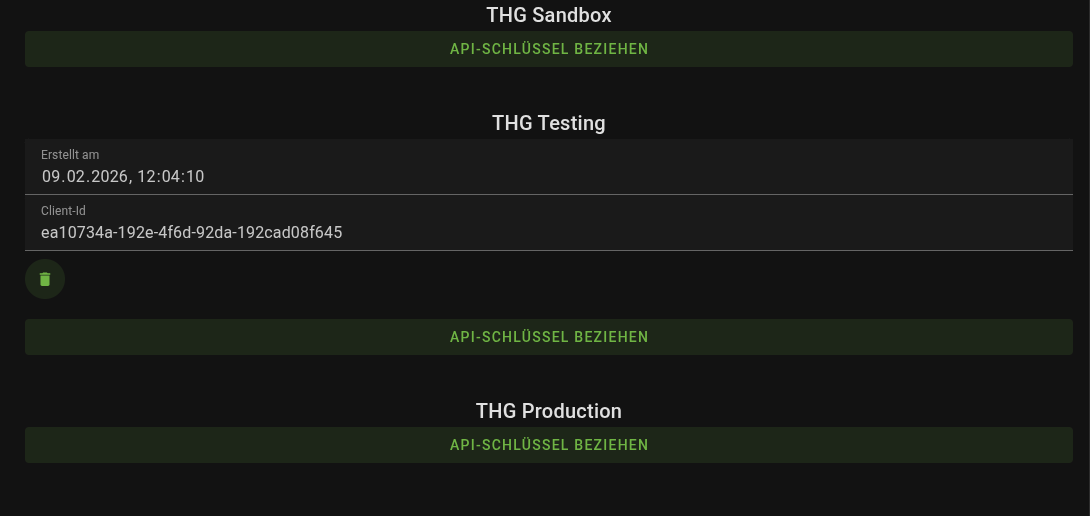
You can find our API at https://thg.nxtlabs.online.
Managing OAuth2 Clients
To use the API, you need an API key. We use the OAuth2 standard for machine-to-machine communication via a client ID and a client secret.
You can create OAuth2 clients yourself in the customer portal under Customer Portal / API Settings, temporarily activate or deactivate them, and delete them. OAuth2 clients can be used without limitation and do not expire.
You are also welcome to create multiple clients, activate and deactivate them, or delete them again.
Store your client ID and client secret in a secure place immediately after creating them.
You will need them again in the next step. By the way, we do not store the client secret ourselves and cannot reconstruct it.
Note: Unused OAuth2 clients are deactivated after 4 weeks of inactivity for security reasons and deleted after 12 weeks. However, you can create new OAuth2 clients at any time if you need them again.
Generating a Token
With an active client ID / client secret combination, you can generate a token at any time. The token is valid for 24 hours and allows you to use the enabled services. After that, you simply need to generate a new token.
Note: Replace <client_id>:<client_secret> with your personal client ID / client secret combination.
Note: This is only an example of a valid token. The actual token is contained in the “access_token” field and is a JWT.
Sending a Request to the API
To authorize a request to one of our API endpoints, include the generated token in the HTTP Authorization header (Bearer <token…>) along with your request.
Note: Replace with the token generated for you.
Example response:
Well done! You have successfully sent a request to our API and received a valid response (HTTP/2 200). Further technical information about the available API endpoints can be found in our API-Documentation documentation.
Verifying a Token Using JWKS
What is a JSON Web Key Set? The generated tokens are JSON Web Tokens (JWTs) with a valid signature. To enhance your own security, we recommend verifying the token signature using the JSON Web Key Set (JWKS), which can be downloaded from the JWKS endpoint .
Please note: For security reasons, the JWKS is regenerated irregularly. Therefore, it is advisable to fetch the JWKS dynamically instead of storing it locally.